Skip to content
One Pager Template

Business One Pager Template

A company overview on one page: who you are, what you do, who it is for, proof and contact. Download it or fill it in with the maker.

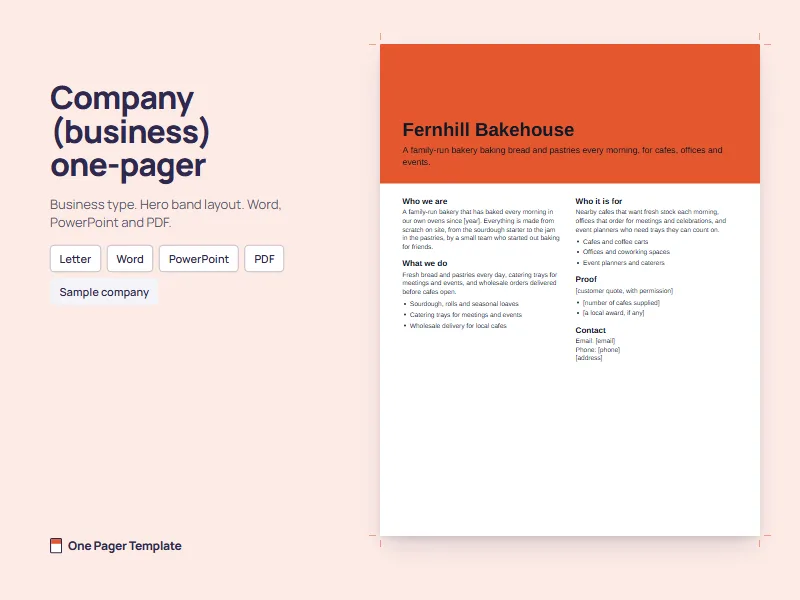
Company (business) one-pager template preview, filled in for a made-up Sample company

Business one-pager template

Business sections, hero band layout, US Letter. Every section holds a bracketed prompt.

For Google Docs or Google Slides: download the file, then upload it to Google Drive and open it there.

Fill it in with the maker

The files come from the same engine as the one pager template maker, so the download and the maker share one layout, measured to fit one page.

What a business one-pager needs

Five sections make up a company overview. On the wireframe, the two that readers look up rather than read, who it is for and how to get in touch, sit in a side column. In the template's hero band layout they take the right-hand column under the band, in the same order.

Title Tagline: who it is for and what they get Who we are What we do Proof Who it is for Contact
Who we are
Two or three sentences on what kind of business you are, how long you have been doing it and what makes you different. Leave out the founding story unless it explains why someone should buy.
What we do
Your main products or services in one sentence, then up to three bullets. Name the things a customer can actually order, not your values.
Who it is for (sidebar)
The customers you serve best, specific enough that the right reader thinks "that is me". A short line or a few bullets.
Proof
One client quote you have permission to use, or a result you can show. Optional: if you have nothing yet, leave it out rather than fill it with adjectives.
Contact (sidebar)
An email, a phone number and a website or address, as plain text. One person's name helps; a list of departments does not.

Wording that works in each section

Start from these lines and replace every bracket with your own facts. They are deliberately plain: a company overview is read quickly, often by someone deciding whether to forward it.

SectionFill-in wording
Tagline[What you do] for [who] in [where].
Who we are[Company] is a [kind of business] that [what you do] for [whom].
What we doThree bullets that start with a verb: Install [product]. Maintain [system]. Train [team].
Who it is for[Customer type] who need [outcome].
Proof[Named client, with permission]: "[quote]". Or: [result] for [client] in [time].
ContactEmail: [email]. Phone: [phone]. Website: [website], written out as plain text.

Cut any line a competitor could sign unchanged, such as "a leading provider of innovative solutions" or "customer-focused and results-driven". If a sentence would still be true with another company's name in it, it tells the reader nothing about you. Specific nouns do the work instead: the trades you serve, the town you cover, the things a customer can order.

For the order of work, from picking the reader to the final check, follow how to make a one pager.

Who reads a company one-pager

  • Prospects and clients look for what you do and whether it fits them, so What we do and Who it is for carry the page.
  • Partners and suppliers want to know how big you are, how you work and who to call. Make the contact block easy to find.
  • Event contacts took the page from a table or a handshake. They need a reminder of who you are in one line, and a reason to follow up.
  • New hires read it to understand the company in five minutes. Plain words beat the sales voice here.

If one page has to serve all four, write it for the reader who matters most right now, then save a copy and change the tagline and the order of sections for the others. The section set stays the same; only the emphasis moves.

When the page is really about one offer, a sales one pager fits better. For a single product, use a product one pager, and for fundraising, an investor one pager.

A filled example

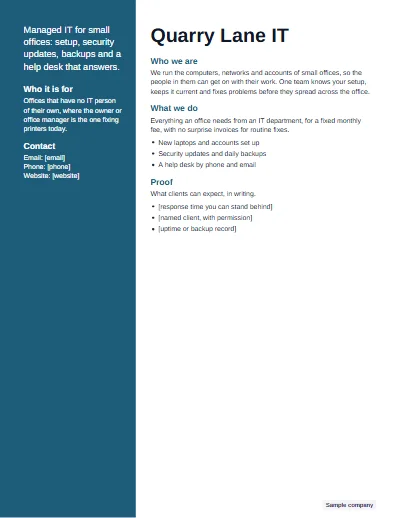
Quarry Lane IT, a made-up IT services firm, uses the sidebar layout: who it is for and the contact lines sit in the colored column, and the proof section keeps its response time in brackets until the firm can put a real one in writing.

Sample company: Quarry Lane IT, a business one-pager in the Sidebar layout
Sample company

Company one-pager: an IT services firm

Business one-pager, Sidebar layout, Ocean

Quarry Lane IT

Managed IT for small offices: setup, security updates, backups and a help desk that answers.

Who we are

We run the computers, networks and accounts of small offices, so the people in them can get on with their work. One team knows your setup, keeps it current and fixes problems before they spread across the office.

What we do

Everything an office needs from an IT department, for a fixed monthly fee, with no surprise invoices for routine fixes.

  • New laptops and accounts set up
  • Security updates and daily backups
  • A help desk by phone and email

Who it is for

Offices that have no IT person of their own, where the owner or office manager is the one fixing printers today.

Proof

What clients can expect, in writing.

  • [response time you can stand behind]
  • [named client, with permission]
  • [uptime or backup record]

Contact

Email: [email]
Phone: [phone]
Website: [website]
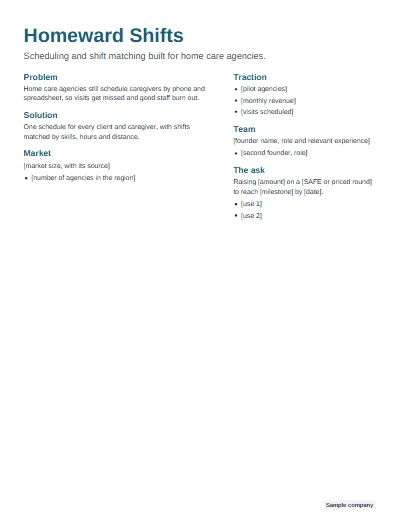
There are more company one-pagers, a bakery and a landscaping business among them, in the one pager examples.

Questions

What is a business one pager?

A business one pager is a single page that introduces a company: who it is, what it does, who it serves, why it can be trusted and how to get in touch. Companies hand it to prospects, partners and new contacts, attach it to emails, or leave it behind after a meeting.

What should a company one pager include?

Five parts cover it: who you are in one or two sentences, what you do as a few bullets, who it is for, proof such as a client quote or a result you can name, and contact details. Add your logo and one brand color, and keep the whole thing to one side of one page.

What is the difference between a one sheeter and a one pager?

Usually nothing: one sheet, one pager and one-sheeter are different names for the same single-page summary. Some people use one sheet for a printed product or sales sheet and one pager for a company or project overview, but readers rarely draw the line. What matters is that it fits one side.

What is a one pager deck?

People use it for a single slide or page that sums up a longer pitch deck, often sent ahead of a meeting or left behind after it. It works best as a portrait page rather than a wide slide. The PowerPoint download here is one portrait slide sized like a page, so it fills that role.

Is there a business one pager template in Word?

Yes. Download the Word file above for an editable company one-pager with the five sections laid out, or the PowerPoint file if you prefer moving boxes freely. For Google Docs or Slides, upload either file to Google Drive and open it there. The PDF is ready to print as it is.

How long should a business one pager be?

One side of one page, with each section kept to two or three lines or a few bullets. If you have more to say, link to it in plain text, such as your website address, rather than adding a second page. Put the offer and the contact details where they are easy to find.

Should a business one pager include prices?

Only if your prices are simple and stable, such as a fixed package or a starting rate. Prices that change or depend on scope date the page quickly and invite comparison before you have explained the value. Many company one-pagers end with a next step, such as a call, instead of a price list.